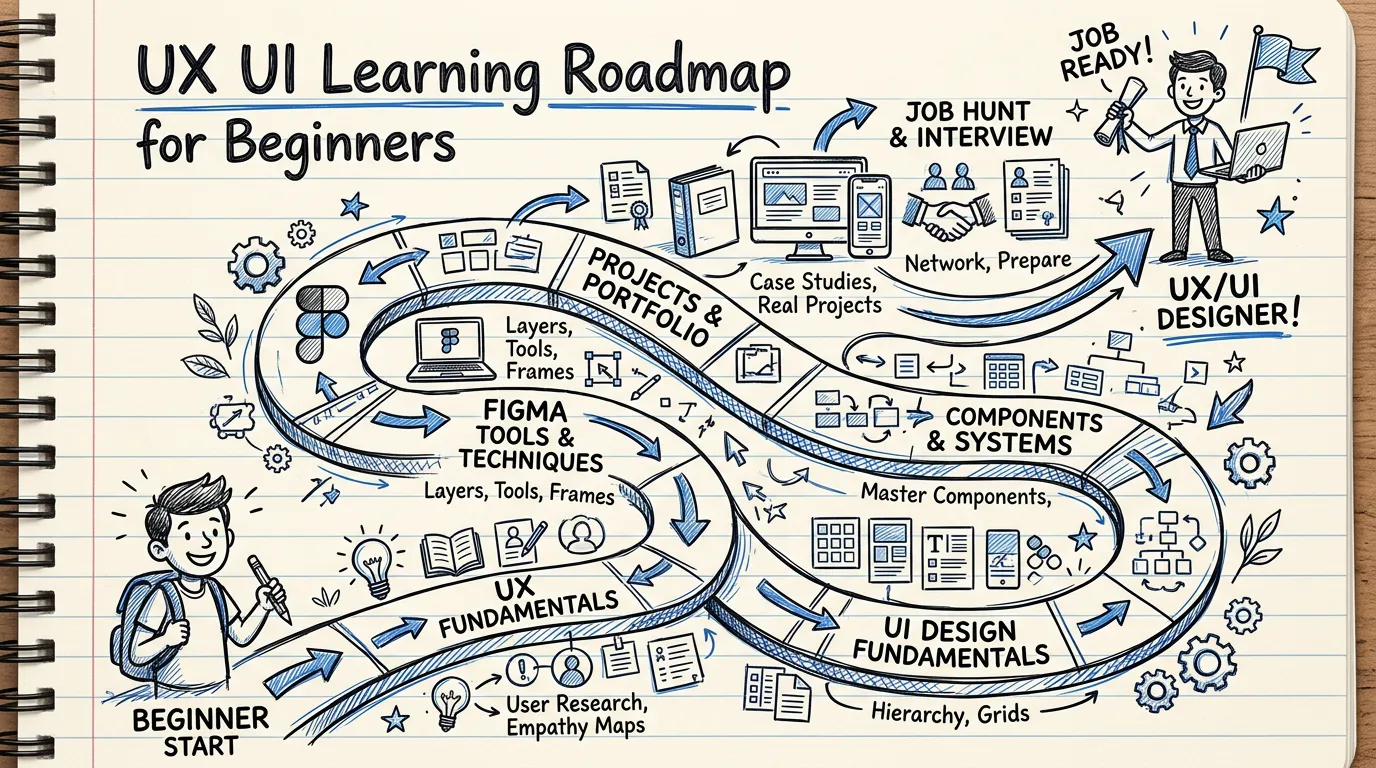
How to Start Learning UX UI Design: A Complete Roadmap from a 15-Year Veteran
A practical step-by-step guide to learning UX UI design from scratch. Covers UX design principles, Figma, UI components, UX research, portfolio building, and staying current with AI in UX. Written by a senior UX manager with 15+ years of experience.
Before you begin: what this guide is and who it is for
This is a practical roadmap for anyone who wants to learn UX UI design, whether you are a complete beginner, a developer looking to upskill UX capabilities, a graphic designer transitioning into product design, or someone considering a mid-career switch.
I have been working in user experience UX design for over 15 years, currently as a senior UX manager. This guide is based on what I have seen actually work in the industry, not theoretical advice from someone who has never shipped a product.
You do not need a computer science degree. You do not need to know how to code. You do need curiosity about how people interact with products, and the discipline to learn systematically.
Step 1: Understand what UX/UI actually is
Most beginners make the same mistake: they think UX design is about making things look pretty. It is not.
UX (User Experience) Design is the process of designing the entire experience a person has with a product. It involves understanding user problems, conducting research, designing flows, testing solutions, and iterating based on evidence. It is problem-solving with humans at the center.
UI (User Interface) Design is about designing the visual layer and interactions of an interface. It is a subset of UX that focuses on how things look, how components behave, and how information is visually communicated.
Both disciplines overlap significantly, but they are not the same thing. If you only care about aesthetics, graphic design might be a better fit. If you find yourself asking "why can't people find this button?" or "where does this flow break down?" then UX is where you belong.
Where to start:
- Read "The Design of Everyday Things" by Don Norman. It will fundamentally change how you see the world.
- Take the Google UX Design Certificate on Coursera (free trial available). It provides solid foundational coverage.
- Start observing the apps you use daily. Ask yourself why each design decision was made. This habit alone will accelerate your learning.
Step 2: Learn UX design principles before touching any tool
Before you open Figma, build a foundation in UX design principles. Without this, you will become someone who can operate a tool but cannot design.
Core principles to study:
- Design Thinking — The Empathize, Define, Ideate, Prototype, Test framework. Understand the process, not just the diagram.
- Information Architecture — How to structure and organize content so people can find what they need.
- Interaction Design — How interfaces respond to user actions. Includes flow design, state management, and feedback patterns.
- Usability Heuristics — Jakob Nielsen's 10 heuristics for evaluating interface quality. Memorize these. Use them daily.
- Accessibility — Designing for all users, including those with disabilities. This is not optional; it is a professional requirement.
Do not try to learn everything simultaneously. Start with Design Thinking and Usability Heuristics. Expand from there.
Free resources:
- Nielsen Norman Group articles at nngroup.com. This is the most authoritative source of UX knowledge available.
- Interaction Design Foundation (some courses are free).
- Laws of UX at lawsofux.com. A concise reference for psychology principles applied to design.
Paid resources:
- Google UX Design Professional Certificate on Coursera.
- Nielsen Norman Group UX Certification.
- For structured, hands-on learning with real industry case studies, see workshops I run.
Step 3: Master the tools, starting with Figma
In 2026, Figma is the industry standard for UX/UI design. Nearly every product team uses it. Start here.
What you need to learn in Figma:
- Frames and Layout Grids for responsive design.
- Auto Layout for building flexible, production-ready components.
- Components and Variants for reusable design elements.
- Design Tokens (color, typography, spacing) for systematic design.
- Prototyping with interactions, transitions, and conditional logic.
- Collaboration features including comments, branching, and dev mode.
A practical warning: do not spend hundreds of dollars on Figma courses. The tool changes frequently, and paid courses become outdated within months. Learn from Figma's official documentation and tutorials, then practice by building real things.
Free resources:
- Figma's official tutorials at figma.com/resources.
- Figma's YouTube channel.
- Try building your own design system using the Design System Generator. It is a free tool I built specifically for practice and learning.
Step 4: Study UI components and learn when to use each one
This is where most self-taught designers fall short, and it is immediately obvious in their work.
Knowing what a component looks like is easy. Knowing when to use it, and more importantly when not to use it, is what separates junior designers from competent ones.
Key decisions you need to understand:
- Modal vs. Drawer vs. Toast — Which level of interruption is appropriate for the action?
- Dropdown vs. Radio buttons vs. Toggle — Which input type suits the number and nature of options?
- Table vs. Card vs. List — Which data display format matches the use case?
- Tabs vs. Accordion vs. Stepper — How should content be grouped and revealed?
Every component exists for a reason. Using a modal when a toast would suffice creates unnecessary friction. Using a dropdown for two options wastes clicks. These decisions compound across an entire product.
I created a free UX Component Guide that covers exactly this: when to use each component, with examples of correct and incorrect usage. It is one of the most practical starting points for building real UI judgment.
Step 5: Learn UX research basics
Good UX design starts with evidence, not assumptions. If you want to be a designer who solves real problems, you need to know how to gather information from actual users.
Essential research skills:
- User Interviews — How to ask questions that reveal genuine insights rather than confirming your assumptions.
- Usability Testing — How to observe people using a prototype and identify where they struggle.
- Survey Design — How to write unbiased questions that produce actionable data.
- Affinity Mapping — How to organize research findings into meaningful patterns.
- Personas and Journey Maps — How to synthesize research into tools that align your team.
You do not need to become a full-time researcher. But every UX designer should be able to conduct basic research independently.
Free resources:
- "Just Enough Research" by Erika Hall. Short, practical, and immediately applicable.
- UX research method guides on nngroup.com.
- The best free practice: run a usability test with 5 people using any app. You will learn more in one afternoon than in a week of reading.
Step 6: Build your first portfolio
In UX, your portfolio matters more than your resume. But most beginners build their portfolios wrong.
What a strong UX portfolio shows:
- Your thinking process, not just final screens.
- The problem you were solving and why it mattered.
- How you gathered evidence (research, data, testing).
- Why you made specific design decisions.
- The outcome and what you learned.
Common mistakes to avoid:
- Showing only polished visuals with no process documentation.
- Doing unsolicited redesigns of popular apps (everyone does this; it does not differentiate you).
- Failing to clearly state your role and contribution.
If you have no professional experience yet:
- Create case studies from real problems around you. Design an app for a local business, a tool for your community, or a solution for a process you personally find frustrating.
- Choose problems where you understand the context deeply. Authenticity stands out.
- Conduct actual usability tests on your prototypes, even for personal projects. This demonstrates rigor.
Step 7: Get real experience through freelance and volunteer work
A portfolio built from personal projects is a good start. Real-world experience is better. Even small-scale work counts.
How to gain experience when you have none:
- Freelance — Take small web or app design projects on platforms like Upwork or Fiverr. Set modest rates initially. The goal is experience, not income.
- Volunteer — Offer design help to NGOs, community organizations, or early-stage startups that cannot afford a designer.
- Hackathons — Join hackathons that need designers. You will build portfolio pieces and professional connections simultaneously.
- Internships — If you are a student or recent graduate, an internship on a product team is extremely valuable.
The key insight: do not wait until you feel ready. I started doing UX work when I barely knew what I was doing. Learning by building real things for real people is exponentially faster than learning in isolation.
Step 8: Stay current with AI in UX
In 2026, AI is transforming how UX work gets done. If you are starting now, you need to learn AI alongside your UX foundations.
Where AI helps UX designers today:
- Synthesizing research from interview transcripts and survey data.
- Generating draft UI copy, error messages, and onboarding content.
- Creating initial prototypes and layout explorations.
- Analyzing behavioral data and identifying patterns.
Where AI still falls short:
- Deciding which problems are worth solving.
- Understanding business context, organizational politics, and cultural nuances.
- Building relationships with stakeholders and users.
- Making judgment calls about what is "right" for a specific situation.
Designers who use AI effectively are 2-3x more productive. But designers who rely on AI without strong UX fundamentals produce work that looks polished but fails in practice. Build your foundation first. Then AI becomes an extraordinarily powerful amplifier.
Where to go from here
Learning UX UI design is not a quick process, but it is an achievable one. The path is clear: understand the fundamentals, learn the tools, study how components work, practice research, build a portfolio, and get real experience.
The resources available today for anyone looking to upskill UX capabilities are vastly better than what existed when I started. There are free courses, free tools, and active communities ready to help.
Start today. Start with one step. Build something. Test it with a real person. Learn from what breaks.
For a practical first step, explore the free UX Component Guide I created. It will give you a concrete understanding of when and why to use each UI component, which is one of the most immediately applicable skills in UX design. And check out more articles where I share lessons from 15 years of building products and leading design teams.
Free UX Consultation
Fill in a few details and I'll reach out via LINE or Email