Figma MCP: Design-to-Code Pipeline สำหรับ Scalable Product ข้ามหลายโปรเจค
วิธีใช้ Figma MCP Server เชื่อม Design System เข้ากับ AI Coding Tools เพื่อสร้าง Design-to-Code Pipeline ที่ Scale ได้ข้ามหลายโปรเจค — จากประสบการณ์จริงในการบริหาร Design System ระดับองค์กร
ปัญหาที่ทุก Design Team เจอ
ถ้าคุณเคยดูแล Design System ที่ใช้งานข้ามหลายโปรเจค คุณจะรู้ดีว่ามันเป็น nightmare แค่ไหน
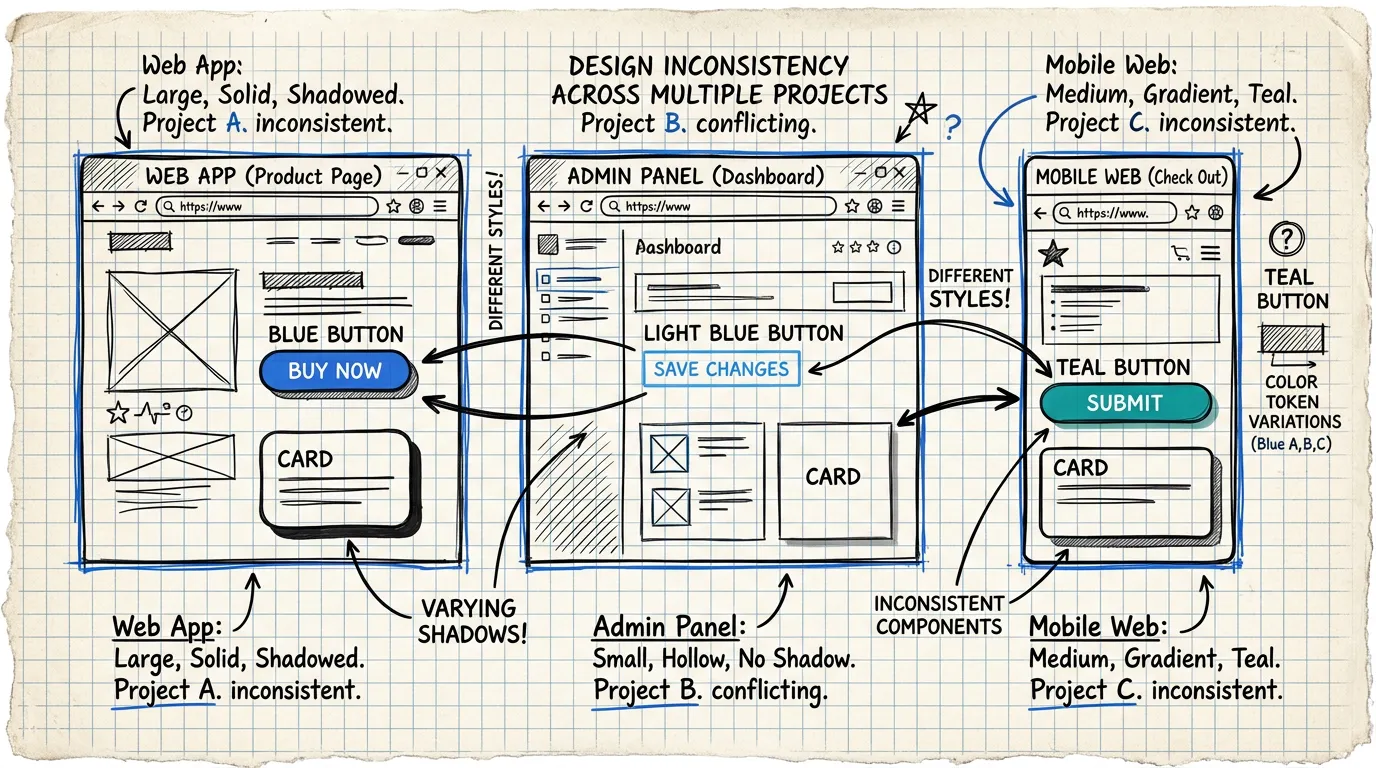
Button ใน Project A ใช้ border-radius: 8px แต่ Project B ใช้ 12px Card component ใน Dashboard app มี shadow ไม่เหมือนกับ Mobile app Color token ชื่อ primary-500 ใน Figma แต่ developer เรียกว่า brand-blue ในโค้ด
ทุกครั้งที่ handoff design ให้ dev มันเหมือน เกม Telephone — ข้อมูลเพี้ยนไปทีละนิดจนสุดท้ายผลลัพธ์ไม่เหมือน design อีกต่อไป
ยิ่งมีหลายโปรเจค ปัญหายิ่งทวีคูณ ไม่ใช่บวก — มันเป็น ปัญหาแบบ exponential
Figma MCP คืออะไร?
MCP ย่อมาจาก Model Context Protocol — มาตรฐานเปิดที่ Anthropic สร้างขึ้นเพื่อให้ AI models สามารถเชื่อมต่อกับ tools ภายนอกได้อย่างเป็นระบบ
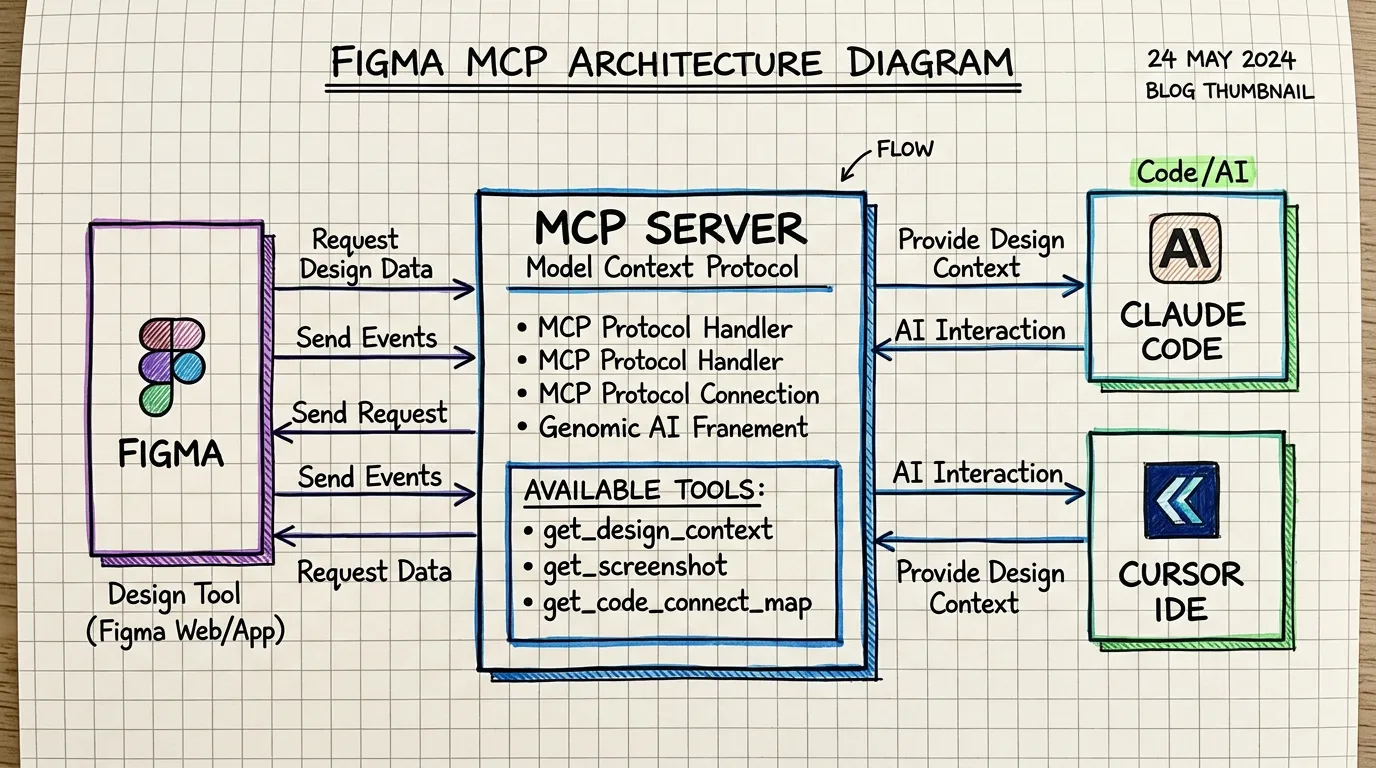
Figma MCP Server คือ สะพานเชื่อมระหว่าง Figma กับ AI coding tools อย่าง Claude Code, Cursor, หรือ Windsurf ทำให้ AI สามารถ:
- อ่าน design จาก Figma ได้โดยตรง (component, layout, spacing, color)
- เข้าใจ design context ไม่ใช่แค่ pixel แต่เข้าใจ hierarchy, component structure, และ design intent
- Generate code ที่ตรงกับ design system ของโปรเจค ไม่ใช่ generic code
- Map components ระหว่าง Figma components กับ codebase components ผ่าน Code Connect
ลองคิดภาพว่ามันเหมือน translator ที่พูดได้ทั้งภาษา Design และภาษา Code — และยังเข้าใจ context ของโปรเจคคุณด้วย
ทำไม MCP ถึงเปลี่ยนเกมสำหรับ Multi-Project Teams
ก่อน MCP: The Copy-Paste Hell
ก่อนหน้านี้ workflow ของ design-to-code มักเป็นแบบนี้:
- Designer ทำ design ใน Figma
- Developer เปิด Figma inspect panel
- Copy CSS values ทีละตัว (padding, margin, font-size...)
- เขียน component ใหม่ตาม style ที่เห็น
- QA พบว่าไม่ตรง design → แก้ → วนซ้ำ
แต่ละโปรเจคทำแบบนี้แยกกัน ไม่มี shared understanding ระหว่าง projects
หลัง MCP: Single Source of Truth
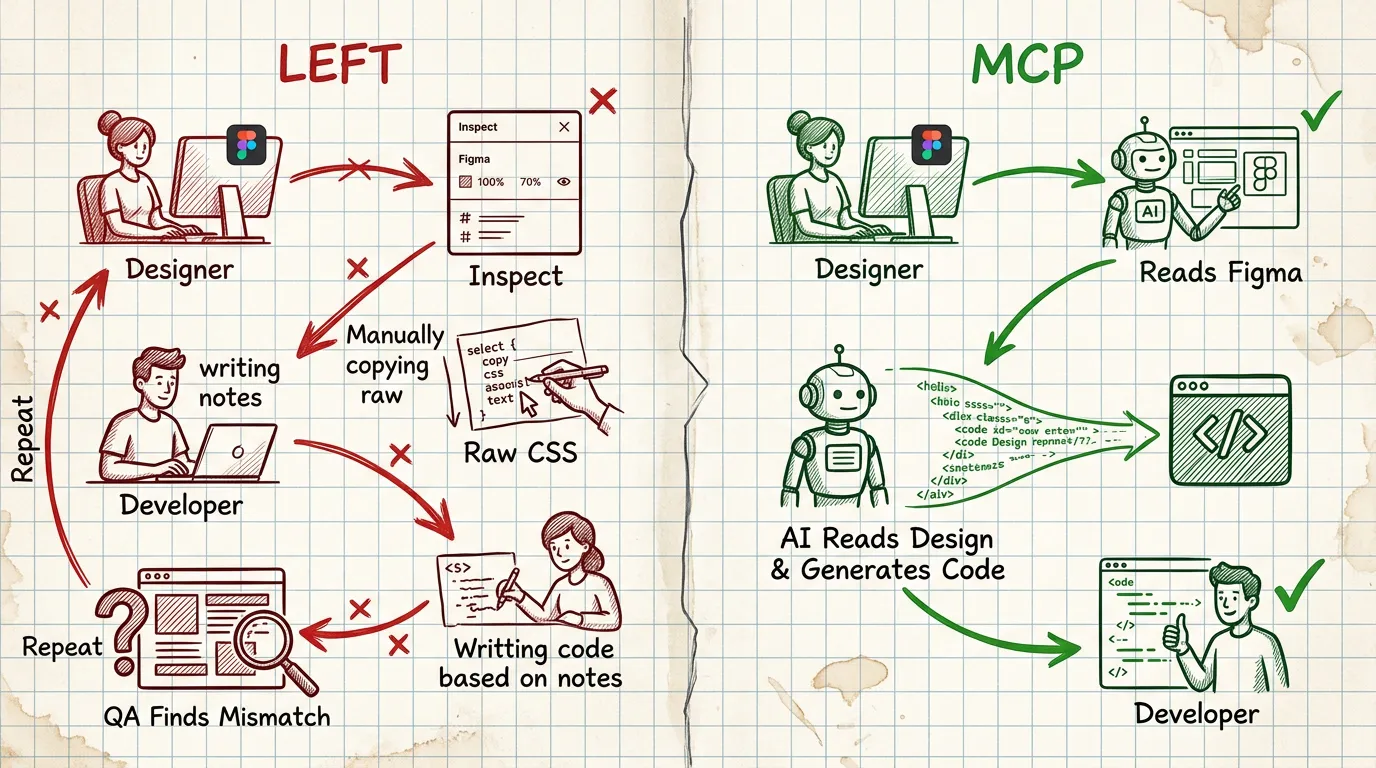
ด้วย Figma MCP workflow เปลี่ยนเป็น:
- Designer ทำ design ใน Figma (เหมือนเดิม)
- AI อ่าน design context โดยตรงจาก Figma
- AI generate code ที่ match กับ project stack (React, Vue, Svelte, etc.)
- Code Connect map Figma components → codebase components
- ทุกโปรเจคใช้ mapping เดียวกัน → consistency ข้าม projects
วิธีตั้งค่า Figma MCP สำหรับหลายโปรเจค
Step 1: เปิดใช้งาน Figma MCP Server
ใน Claude Code หรือ AI tool ที่รองรับ MCP ให้เพิ่ม Figma MCP Server ผ่าน settings โดย Figma MCP เป็น official server ที่ Figma ให้บริการ
Step 2: ทำความเข้าใจ Core Tools
Figma MCP มี tools หลักที่ควรรู้:
get_design_context— ดึง design พร้อม code, screenshot, และ hints (tool ที่ใช้บ่อยที่สุด)get_screenshot— จับภาพ design เพื่อ visual referenceget_metadata— ดึงข้อมูล file structure และ pagesget_code_connect_map— ดู mapping ระหว่าง Figma ↔ Code componentsadd_code_connect_map— เพิ่ม mapping ใหม่
Step 3: สร้าง Code Connect Mappings
นี่คือ หัวใจของ scalability — Code Connect คือ mapping ที่บอกว่า Figma component ไหนตรงกับ code component ไหน
Figma "Button/Primary"  →  <Button variant="primary" />
Figma "Card/Product"     →  <ProductCard />
Figma "Input/Text"       →  <TextField />
เมื่อ AI เห็น Button/Primary ใน Figma design มันจะ generate code ที่ใช้ <Button variant="primary" /> จาก component library ของคุณ — ไม่ใช่สร้าง button ใหม่จาก scratch
Step 4: Share Mappings ข้ามโปรเจค
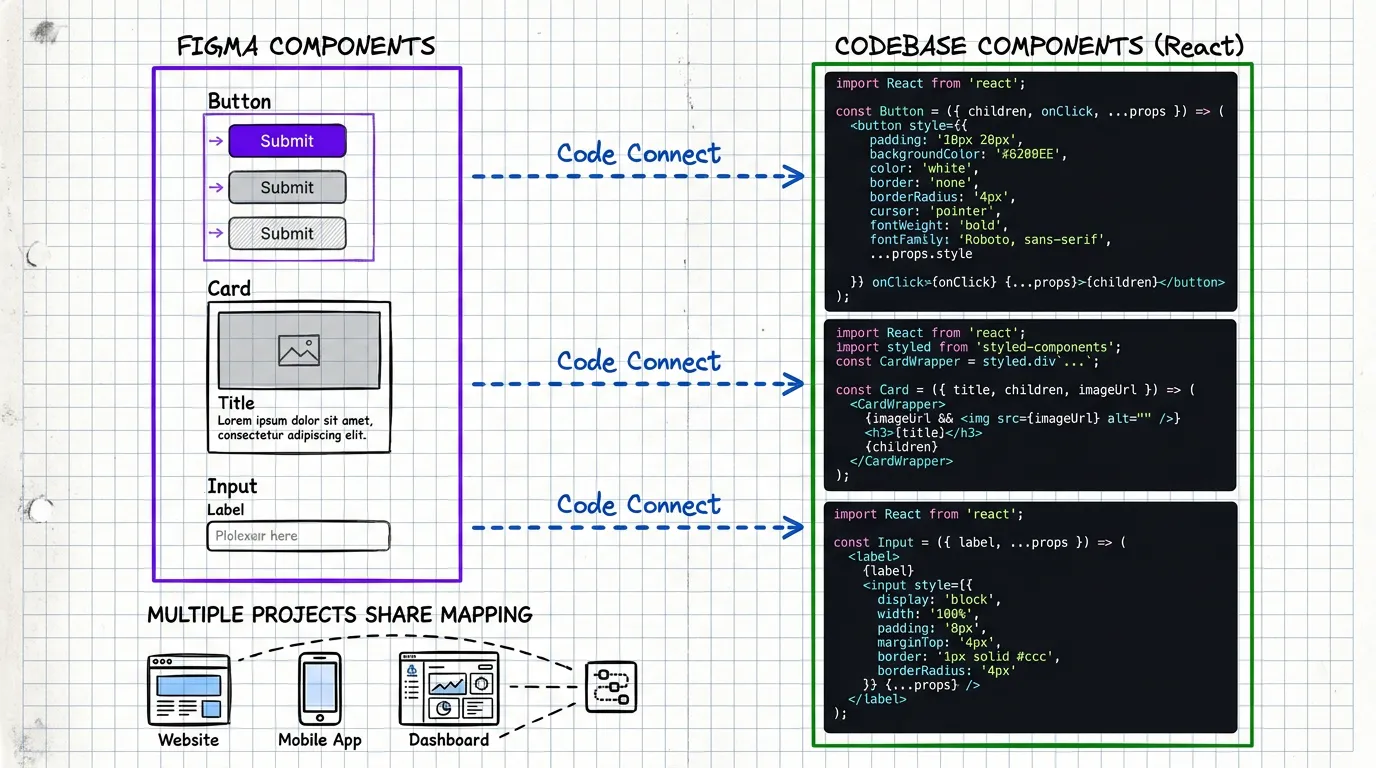
Key insight: Code Connect mappings สามารถ share ข้ามโปรเจคได้ ถ้าทุกโปรเจคใช้ shared component library เดียวกัน (เช่น internal design system package)
Project A (Web App)      → uses @company/ui-kit
Project B (Admin Panel)  → uses @company/ui-kit
Project C (Mobile Web)   → uses @company/ui-kit
                              ↑
                    Code Connect maps to this
ทุกโปรเจคจะได้ consistent code ที่อ้างอิง component เดียวกัน
Real-World Workflow: จาก Design สู่ Production
ลองดูตัวอย่างจริงว่า workflow เป็นยังไง
1. Designer ส่ง Figma URL
Designer ส่ง link ของ design ที่ทำเสร็จมา เช่น figma.com/design/abc123/Dashboard?node-id=42:1337
2. AI อ่าน Design Context
AI ใช้ get_design_context เพื่อดึงข้อมูลจาก Figma:
- Code: React + Tailwind code ที่ Figma generate ให้เป็น reference
- Screenshot: ภาพจริงของ design เพื่อ visual verification
- Hints: Design tokens, spacing values, component names
3. AI Adapt ให้เข้ากับ Project
นี่คือจุดสำคัญ — AI ไม่ได้ใช้ code จาก Figma ตรงๆ แต่ adapt ให้เข้ากับ project stack:
- ใช้ existing components จาก codebase (ผ่าน Code Connect)
- Map design tokens ให้ตรงกับ project's token system
- Follow project conventions (naming, file structure, patterns)
4. Review & Iterate
Developer review code ที่ AI generate ปรับแก้ตามต้องการ แล้ว commit ส่วนที่ต้องการ iteration กลับไป Figma ก็ทำได้รวดเร็วเพราะ design-code connection ชัดเจน
Scaling Strategies สำหรับหลายโปรเจค
Strategy 1: Centralized Design System + Distributed Code Connect
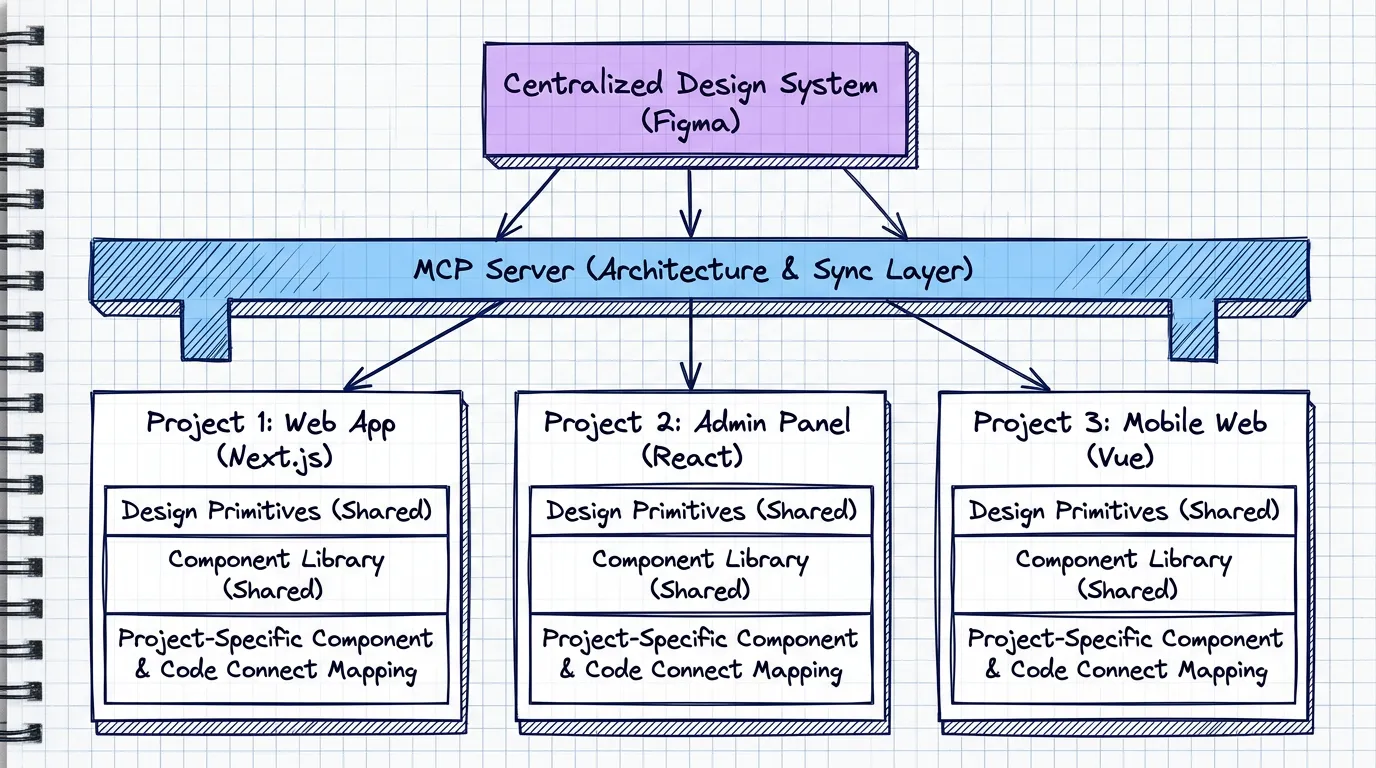
- มี 1 Figma Design System library ที่ทุกโปรเจค reference
- แต่ละโปรเจคมี Code Connect mapping ของตัวเอง (เพราะ stack อาจต่างกัน)
- Design tokens sync ผ่าน Figma Variables → CSS Variables
Strategy 2: Design System Rules
ใช้ create_design_system_rules เพื่อกำหนดกฎของ design system:
- Component usage guidelines
- Spacing และ sizing conventions
- Color token naming conventions
- Typography scale rules
Rules เหล่านี้ช่วยให้ AI generate code ที่ consistent แม้จะทำงานกับคนละโปรเจค
Strategy 3: Progressive Code Connect
อย่าพยายาม map ทุก component ตั้งแต่แรก — ใช้ approach แบบ progressive:
- เริ่มจาก core components (Button, Input, Card, Modal)
- เพิ่ม layout components (Grid, Stack, Container)
- ค่อยๆ เพิ่ม domain-specific components (ProductCard, PolicySummary)
ทุกครั้งที่ AI ต้อง generate component ใหม่ที่ควรจะเป็น shared component ให้ add เข้า Code Connect map ทันที
สิ่งที่ได้เรียนรู้จากการใช้งานจริง
ข้อดี
- ลด design-code gap อย่างมาก — จากที่ต้อง inspect ทีละ property ตอนนี้ AI อ่าน design context ทั้งหมดในครั้งเดียว
- Consistency ข้ามโปรเจค — Code Connect ทำให้ทุกโปรเจคใช้ component เดียวกัน
- ลดเวลา handoff 60-70% — Designer ส่ง Figma link, AI ทำ code generation, developer review
- Design System adoption สูงขึ้น — เมื่อ AI ใช้ design system components โดยอัตโนมัติ developer ก็ใช้ตาม
ข้อควรระวัง
- Figma design ต้อง structured ดี — ถ้า design ไม่ใช้ Auto Layout หรือตั้งชื่อ layer มั่ว AI จะ generate code ที่ไม่ดี
- Code Connect ต้อง maintain — เมื่อ component library update ต้อง update mapping ด้วย
- AI ไม่ได้สมบูรณ์แบบ — ยังต้อง review code ทุกครั้ง โดยเฉพาะ responsive behavior และ edge cases
- Security consideration — Figma MCP เข้าถึง design files ของคุณ ต้องมั่นใจว่า access control เหมาะสม
อนาคตของ Design-to-Code
เรากำลังอยู่ในจุดเปลี่ยนของ design-to-code workflow ที่น่าตื่นเต้นมาก
Figma MCP เป็นแค่จุดเริ่มต้น สิ่งที่กำลังจะเกิดขึ้นคือ:
- Bi-directional sync — ไม่ใช่แค่ design → code แต่ code → design ด้วย
- Automated design QA — AI ตรวจว่า implementation ตรง design หรือไม่
- Cross-platform Code Connect — mapping เดียวใช้ได้ทั้ง Web, iOS, Android
- Design System as Code — design system ที่ define ใน code แล้ว generate เป็น Figma components
สำหรับทีมที่ดูแลหลายโปรเจค นี่คือช่วงเวลาที่ดีที่สุดในการเริ่มสร้าง design-to-code pipeline ที่ scale ได้
เพราะคำถามไม่ใช่ "จะใช้ AI ช่วย design-to-code ไหม" อีกต่อไป — แต่เป็น "จะเริ่มใช้เมื่อไหร่"
ปรึกษา UX ฟรี
กรอกข้อมูลสั้นๆ แล้วจะติดต่อกลับผ่าน LINE หรือ Email